



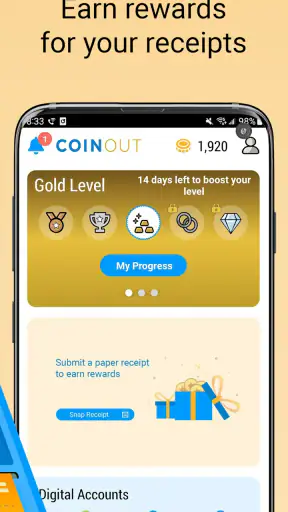
I approached CoinOut as a simple way to turn the receipts already sitting in my wallet into a small shopping reward. That is the app’s central idea: you scan receipts, collect cashback, and work toward gift cards instead of changing where you shop or learning a complicated points system. For a first-time user, that makes the service easy to understand, although the real value depends on how consistently you submit eligible receipts and how patient you are with the reward process.
CoinOut is a free shopping app from CoinOut, aimed at an Everyone audience. It has been available since December 7, 2017, and its current version is 3.8.4-production. The app has passed one million installs, with an average score of 4.2 from roughly sixty-three thousand ratings. Those figures suggest that the basic receipt-scanning idea is familiar and useful to a substantial audience, but they should not be mistaken for a promise of large earnings. I see it as a modest rebate tool, not a replacement for a serious income source.
Getting from the first scan to a useful reward
What to expect before installing
The best way to think about CoinOut is as a habit that pays back gradually. You shop as usual, keep the receipt, open the app, and scan it while the purchase is still easy to remember. The reward comes from completing that small extra step. In my experience, the advantage is not that every individual receipt feels exciting; it is that the process can become almost automatic after grocery trips, pharmacy visits, or other everyday purchases.
This approach is different from a traditional coupon app. Coupons usually ask me to plan before buying, search for a specific offer, or activate a deal in advance. CoinOut is more receipt-centered: the purchase has already happened, and the receipt becomes the item I submit. That makes it a better fit for people who dislike planning shopping around promotions. On the other hand, someone who already compares prices carefully and uses store-specific discounts may get more immediate savings from those tools.
The app’s store summary presents receipt scanning, cashback, and gift cards as the main path. I would keep expectations realistic. A receipt is not the same as a high-value cashback offer, and the usefulness of the balance depends on the receipts you actually generate. If your shopping is infrequent, mostly cashless with digital receipts you cannot easily access, or concentrated in purchases that are difficult to document, the app may not become a meaningful routine.
It is also worth deciding where CoinOut fits among your other shopping tools. I would not uninstall a supermarket loyalty app or abandon a credit-card reward program just because I started using this one. Those services can serve different purposes. A store program may reduce the price at checkout, while CoinOut can give me an additional reason to retain and submit the receipt afterward. The trade-off is extra attention: every reward system adds another place to check, another workflow to remember, and another account balance to monitor.
Setting up without making the process harder
After installing CoinOut, I would begin with a practical goal rather than trying to understand every possible reward immediately. The first goal is simply to reach the point where I can submit one clear receipt successfully. That gives me a working routine and exposes any setup friction early, before I have a pile of receipts waiting.
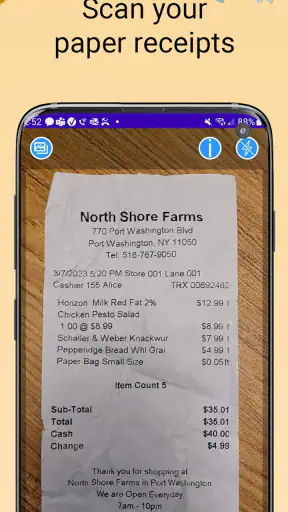
I recommend keeping the first receipt nearby during setup. Choose one that is flat, well lit, and printed clearly. A long grocery receipt is not necessarily the best starting point because folds, faint ink, and multiple sections can make scanning less comfortable. A short, readable receipt gives the camera a better chance of capturing the information without repeated attempts.
CoinOut is available at no purchase price, which lowers the barrier to trying it. Still, “free” should not be confused with effortless. The cost is mainly time and attention: opening the app, positioning the receipt, checking that the scan worked, and remembering to do it before the paper fades or gets lost. I find that this is a better fit for people who can build the scan into an existing routine, such as unpacking groceries or sorting receipts at the end of the day.
The minimum operating-system requirement is Android 7.1, so the app can suit many older Android phones as well as newer devices. That is useful for someone who keeps an older handset as a backup or does not upgrade frequently. The camera experience will still depend on the phone itself. A newer camera may make text capture easier, while an older phone may require more careful lighting and positioning.
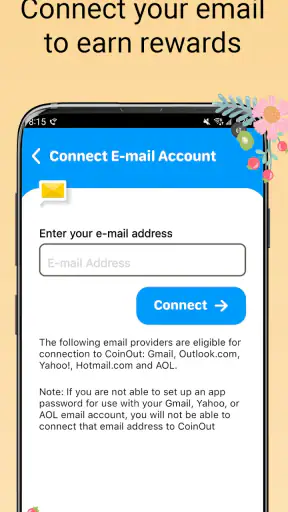
During setup, I would pay attention to the account and reward details shown inside the app rather than assuming that every receipt behaves identically. Receipt services can distinguish between a readable submission and one that needs review, and the app’s own prompts are the most useful guide at that moment. I would also avoid rushing through screens simply to get to the scanner. Understanding where the balance and redemption area are located makes later checking much less confusing.
Your first successful action
For the first scan, I place the receipt on a dark, flat surface and use even light. I avoid glare from windows or overhead lamps because shiny paper can wash out parts of the text. I hold the phone parallel to the receipt instead of at a steep angle, then make sure the full document is visible before capturing it. This sounds basic, but it is the difference between a quick submission and a frustrating series of retakes.
If the receipt is longer than the camera view, I treat the scan as a careful reading task rather than trying to squeeze the entire paper into one distant image. I keep the text legible and follow whatever framing instructions CoinOut presents. The goal is not a beautiful photograph; it is a usable record. A sharp image with readable store and purchase information is more valuable than a complete but blurry image.
Once the receipt is accepted, I check the result instead of closing the app immediately. I want to see whether the submission has moved into the expected state and whether the reward has appeared as anticipated. This confirmation step is one of the most useful habits for beginners because it prevents a common mistake: assuming that taking a picture automatically means the reward has been finalized.
A realistic example is a weekly grocery trip. I return home, put the food away, and leave the receipt beside my phone rather than dropping it straight into the recycling. Before I forget the purchase, I open CoinOut, scan the receipt under good light, and confirm the submission. That entire routine is more sustainable than saving a month’s worth of paper and attempting to process everything in one sitting. Old receipts can become hard to read, and a large batch makes it easier to lose track of what was already submitted.
My first meaningful success would not be a particular balance figure. It would be completing a clean scan, seeing the reward recorded, and knowing that I can repeat the process without guessing. That is the point at which CoinOut starts to feel practical rather than merely interesting.
Where new users usually hesitate
The first source of confusion is the difference between a receipt image and a completed reward. Scanning is the action I control; processing and reward display are separate parts of the experience. If the balance does not change instantly, I would first check the submission status and the app’s instructions instead of scanning the same receipt repeatedly. Duplicate attempts can create more confusion than clarity.
Another issue is receipt quality. Thermal paper fades quickly, especially when left in a hot car or exposed to sunlight. I have found that scanning soon after shopping is not just convenient; it protects the information the app needs to read. Creases across the total, store details, or date are especially troublesome. Flattening the paper before opening the camera is a small step that often saves time.
Long receipts can also make beginners wonder whether the camera has captured enough. Rather than guessing, I would use the app’s on-screen guidance and inspect the image before submitting. If the text is tiny, I move the phone closer while keeping the relevant section inside the frame. If the receipt is too long for one comfortable view, I follow the app’s available scanning flow instead of inventing my own method.
People also sometimes expect CoinOut to work like a price-comparison engine. It is not the place I would begin if my main goal is finding the cheapest product before checkout. Its value comes after shopping, when I have a receipt to submit. That distinction matters because it changes how I measure success. I judge CoinOut by whether it makes receipt rewards easy to collect, not by whether it finds the best supermarket price.
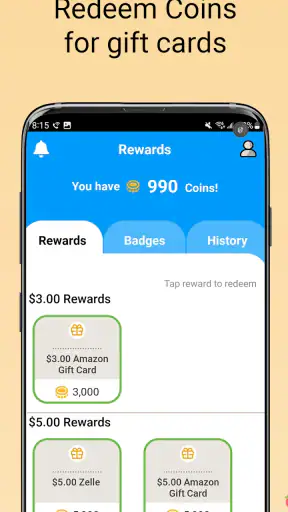
The reward balance can create another misunderstanding. Seeing a balance is not necessarily the same as being ready to receive a gift card. I would open the redemption area and read the current instructions carefully before planning around a reward. The useful question is not only “How much have I earned?” but also “What action is available to me now?” Keeping those two ideas separate makes the app’s progress easier to understand.
Privacy-minded users may also want to think about the information visible on their receipts before making CoinOut part of their routine. Receipts can reveal shopping habits, locations, dates, and transaction details. I would only scan documents I am comfortable submitting through a receipt-reward service, and I would avoid photographing unrelated papers that happen to be near the receipt. This is a sensible boundary for any camera-based shopping app.
How to build a routine that is actually worth your time
The strongest practical tip is to create a receipt landing spot. I keep new receipts in one place until they are scanned, rather than distributing them among a coat pocket, car console, kitchen counter, and shopping bag. This reduces the chance of forgetting them and makes CoinOut a short daily task instead of a weekend cleanup project.
A second useful habit is to scan during a natural pause. Grocery unpacking, putting away pharmacy items, or reviewing a shopping bag are better triggers than relying on memory alone. The app works best when it attaches to something I already do. If I have to invent a separate reminder for every purchase, the time cost can outweigh the small reward and I am more likely to abandon the routine.
I also recommend separating “receipt capture” from “reward planning.” First, submit the clear receipt correctly. Only afterward should I inspect the balance or think about gift cards. This prevents me from rushing the camera work because I am focused on the eventual redemption. It also makes troubleshooting easier: if something goes wrong, I know whether the problem was the image, the submission, or the redemption step.
For households, the app can be useful when one person naturally keeps the receipts. Agreeing on that responsibility avoids duplicate scanning and makes the routine consistent. I would not treat a shared household receipt as an invitation for several people to submit it independently. A clean, single workflow is simpler and reduces the risk of confusion around which account received the reward.
CoinOut is particularly appealing to people who shop at different places and want one receipt-focused routine rather than a separate cashback process for every retailer. The convenience is organizational: I can think in terms of “scan my receipts” instead of remembering a different promotional calendar for each store. The weakness is that a broad routine may feel less targeted than a retailer’s own loyalty offers, which can provide more immediate and specific discounts on products I already buy.
Who should use it and who should skip it
I would recommend CoinOut to a patient shopper who makes regular purchases, keeps receipts long enough to scan them, and likes small rewards that accumulate in the background. It is also a reasonable choice for someone who does not want to change brands or plan every trip around coupons. The app’s free price makes experimentation straightforward, and the Everyone content rating makes it approachable for a broad audience.
I would be more cautious about recommending it to someone who wants instant, predictable savings at checkout. A coupon, store loyalty discount, or card-linked offer may be better when the priority is reducing today’s bill. CoinOut asks for a post-purchase action, so it is not ideal for a person who regularly throws receipts away immediately or finds photographing paper too tedious.
It may also be the wrong fit for shoppers who expect every purchase to produce a substantial return. Receipt rewards are best viewed as a bonus attached to an existing habit. If the scanning process becomes a chore, the small benefit may not justify the time. In that situation, a simpler cash-back card or a store program that applies automatically could be a better match, even if it offers less flexibility across retailers.
The next step after the first reward
After completing the first scan, I would use the next few shopping trips to test consistency rather than chase volume. Can I find the receipt quickly? Does the camera capture it without several attempts? Do I understand when the reward is recorded? Those answers tell me more about whether CoinOut belongs in my routine than the excitement of the first successful submission.
I would also review the reward and gift-card area periodically, especially before assuming that a balance can be used immediately. Reading the current redemption instructions at the point of use is safer than relying on memory from the first day. This is one of the few moments where patience matters more than speed: a minute spent checking the available option can prevent disappointment later.
My overall view is favorable, with a clear limit. CoinOut makes receipt rewards approachable because the action is concrete: keep the paper, scan it, and monitor the resulting balance. The app is not a replacement for careful shopping, and it will not suit people who dislike routine receipt handling. But for a regular shopper who can attach scanning to an existing habit, it offers a low-pressure way to get something back from purchases that would otherwise leave only a fading strip of paper.
My recommendation is to start with one clean receipt and judge the app by the complete path from scan to usable reward. If that path feels simple enough to repeat, CoinOut can become a handy addition to your shopping routine. If you want savings before you pay, automatic rewards, or a more aggressive deal-finding experience, a traditional loyalty or coupon app will probably serve you better.
After using it this way, I see CoinOut: Receipts for Rewards as a practical companion rather than a shopping strategy by itself. Its strength is the small amount of planning required: I can shop normally and deal with the receipt afterward. Its weakness is the same simplicity, because the reward depends on my discipline and may not feel worthwhile for occasional shoppers. For the right user, that balance is honest, manageable, and easy to test without spending money.


